// PRJ-004
AfterHero 保固通:發票、保卡拍一下,保固到期不用記AfterHero: snap the receipt, never track warranty dates by hand
AfterHero 保固通的專案介紹:iOS 已上架、Android 封閉測試中的發票與保固卡管理 App,說明開發動機、功能、資料處理方式、目前進度與限制。About the AfterHero project: a receipt and warranty-card app that is on the iOS App Store and in Android closed beta, with its motivation, features, how data is handled, current progress and limits.
● 已上線Online 最後更新Last updated 2026-11-16
這個專案要解決的問題:發票與保固卡散落在抽屜與信箱,東西壞了才發現過保,也找不到型號與客服電話。The problem it addresses: Receipts and warranty cards are scattered across drawers and inboxes, and you only find out a warranty has expired when something breaks.
專案是什麼
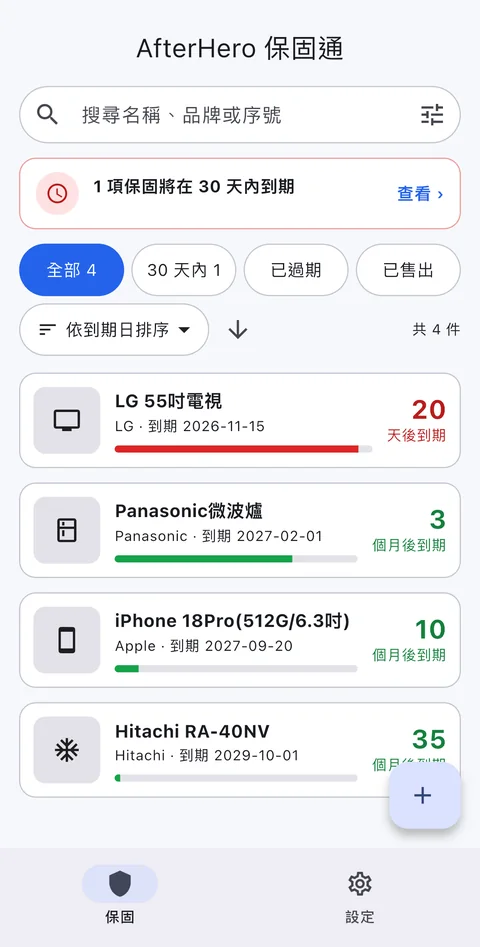
AfterHero 保固通是一個手機 App,把購買證明與保固卡收在手機裡,自動算出保固到期日,並在到期前提醒你。東西壞了,打開就能看到型號、序號與原廠的客服電話。iOS 版已在 App Store 上架,Android 版目前在 Google Play 封閉測試中。
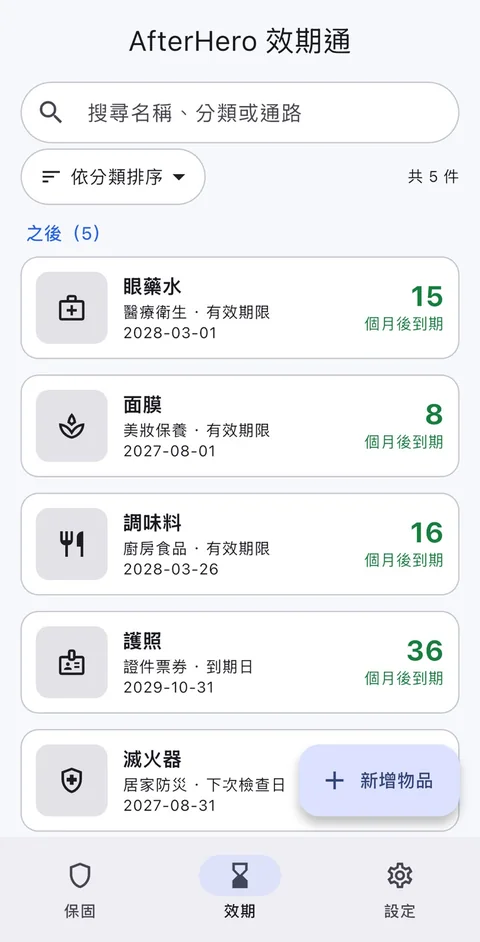
除了保固,它也有「效期通」,可以記錄藥品、保養品、食品、證件票券與居家防災用品的有效期限,快到期前提醒你。
畫面預覽
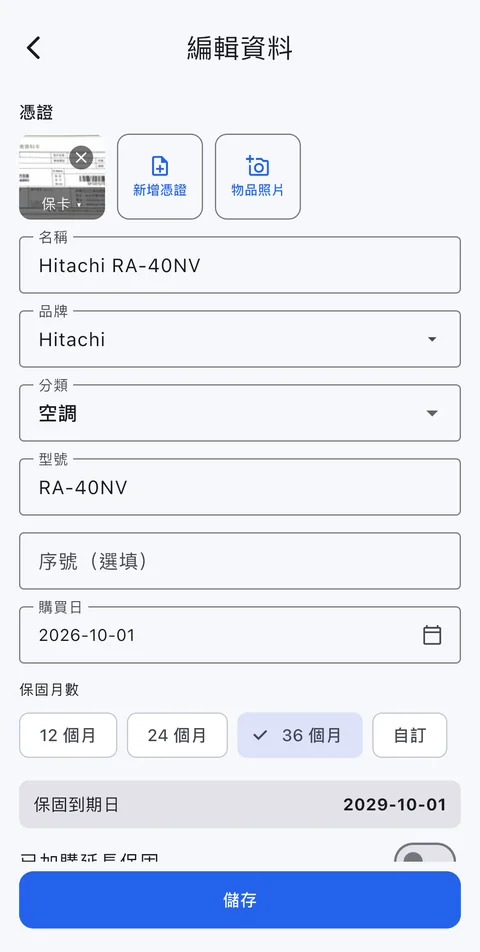
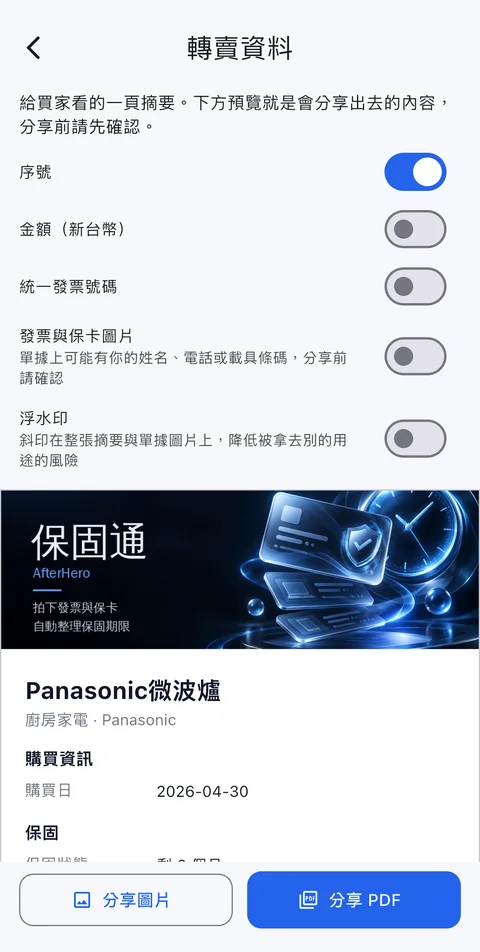
以下為 2026-11-16 擷取的實際畫面,產品更新後可能略有不同。
為什麼做這個
- 家電與 3C 的發票、保固卡通常散落在抽屜、包包或信箱,需要時找不到。
- 保固月數各家不同,過了才發現早就到期。
- 送修時要翻出型號、序號、購買日期,還要另外找客服電話與報修管道。
可以做什麼
- 掃描單據自動帶入:辨識品牌、型號、序號、購買日、金額與統一發票號碼,也讀得懂電子發票證明聯的 QR Code。文字辨識在手機上離線完成。
- 到期日自動計算與提醒:依購買日與保固月數算出到期日,保固到期前 30 天、7 天和當天通知你,維修預計完成日也會提醒,還能把日期加入手機行事曆。
- 延長保固:加購的延長保固可另外登記,以較晚的到期日為準。
- 一鍵聯絡原廠:內建常見品牌在台灣的客服電話、線上報修與代理商資訊,報修要用的資料也整理好。
- 維修紀錄:送修日、維修據點、單號與費用一次記好,維修單也可以拍照辨識。
- 備份與換機:匯出備份檔,存到手機、Google 雲端硬碟或 OneDrive;換手機時匯入即可還原。
- 轉賣資料:把物品資料匯出成圖片或 PDF 給買家,金額、發票號碼與單據圖片預設不附上,由你決定。
- 搜尋與篩選:用名稱、品牌、型號、序號或發票號碼找東西,依保固狀態篩選快到期的項目。
- 效期通:藥品、保養品、食品、證件票券與居家防災用品(共五種分類)也能記錄有效期限,到期前提醒;包裝上的日期可以用相機掃描,確認後再存入;開封後的期限會和包裝標示取較早的那一個。提醒由手機在本機排程,效期物品也會一併收進備份。
- 橫放與摺疊機:手機橫放與摺疊機展開時有對應的版面。
怎麼使用
- 購買後,用 App 拍下發票或保固卡。
- 確認自動帶入的品牌、型號、序號與購買日,必要時修正。
- 設定保固月數,App 會算出到期日並放進清單。
- 東西壞了,打開該筆紀錄,直接使用型號、序號與原廠客服資訊報修。
設計上的取捨
- 資料只存在手機:沒有帳號、沒有自家伺服器,單據照片與紀錄不會上傳,開發者也看不到。取捨是沒有帳號與雲端,因此資料不會自動在多台裝置之間同步,換機請用備份。
- 在手機上辨識文字:辨識不依賴雲端服務,可以離線使用;準確度會受照片品質與單據格式影響,所以建議儲存前核對每個欄位。
- 沒有廣告、不追蹤:不販售任何資料。
目前進度與下載
- iOS:已在 App Store 上架,可以直接 下載 AfterHero 保固通。
- Android:Google 規定新 App 需要至少 12 位測試者連續參與 14 天,才能正式上架,目前正在招募封閉測試者,加入步驟請見 封閉測試申請頁。測試版的資料只存在你的手機,正式版上架後會延續同一個 App,資料不需要重建。
限制與注意事項
- Android 版(同樣有效期通)仍在封閉測試階段,功能與介面可能調整。
- 文字辨識可能出錯,請在儲存前核對品牌、型號、序號與日期。
- 內建的原廠客服資訊可能隨品牌調整而變動,重要的聯絡方式請再以原廠公告為準。
- 保固到期日是依你輸入的購買日與月數計算的提醒,實際保固條件請以原廠保固卡與規定為準。
- 效期通只做記錄與提醒,不提供醫療建議;藥品與食品請以包裝標示及醫師、藥師的指示為準。
前往與回饋
前往 AfterHero 保固通,或直接到 App Store 下載。遇到辨識錯誤或其他問題,請截圖寄到 [email protected]。
What it is
AfterHero is a phone app that keeps your proofs of purchase and warranty cards on your phone, works out the warranty expiry date and reminds you before it ends. When something breaks, you open it and find the model, serial number and the manufacturer's support phone number. The iOS app is on the App Store, and the Android version is in closed testing on Google Play.
Besides warranties it has an Expiry Tracker (效期通) that records the expiry dates of medicines, skincare, food, documents and home-safety items and reminds you before they run out.
Screenshots
Screenshots taken on 2026-11-16. The product may look slightly different after updates.
Why we built it
- Receipts and warranty cards for appliances and electronics end up in drawers, bags or inboxes and cannot be found when needed.
- Warranty periods differ between brands, and you only learn one has expired after the fact.
- Sending something for repair means digging out the model, serial number and purchase date, then looking up support numbers and repair channels separately.
What you can do with it
- Scan to fill in: recognises brand, model, serial number, purchase date, amount and Taiwan uniform invoice number, and reads the QR code on e-invoice receipts. Text recognition runs offline on the phone.
- Expiry dates and reminders: works out the expiry from the purchase date and warranty months, notifies you 30 days, 7 days and on the day the warranty ends, reminds you of the expected repair completion date, and can add dates to your phone calendar.
- Extended warranty: register an extended warranty separately, and the later expiry date applies.
- Contact the maker in one tap: built-in support numbers, online repair links and agent details for common brands in Taiwan, with the details you need for a repair request ready.
- Repair log: keep the repair date, service centre, ticket number and cost in one place, and photograph repair slips for recognition.
- Backup and moving phones: export a backup file to your phone, Google Drive or OneDrive, and import it on a new phone.
- Resale details: export an item's details as an image or PDF for a buyer. Amounts, invoice numbers and receipt images are left out by default, and you decide what to include.
- Search and filter: find items by name, brand, model, serial or invoice number and filter by warranty status to see what is expiring soon.
- Expiry Tracker: medicines, skincare, food, documents and tickets, and home-safety items (five categories) can also have expiry dates, with a reminder before they run out; dates on packaging can be scanned with the camera and confirmed before saving; and after opening, the earlier of the opened-use limit and the printed date applies. Reminders are scheduled on the phone, and expiry items are included in backups.
- Landscape and foldables: there are layouts for a phone held sideways and for an unfolded foldable.
How to use it
- After a purchase, photograph the receipt or warranty card with the app.
- Check the brand, model, serial number and purchase date that were filled in and correct them if needed.
- Set the warranty months and the app works out the expiry date and adds it to the list.
- When something breaks, open that record and use the model, serial number and manufacturer contacts to request a repair.
Design decisions
- Data stays on the phone: there is no account and no server of our own. Receipt photos and records are not uploaded and the developer cannot see them. The trade-off is that without an account or cloud, data is not synced across devices automatically, so use a backup when you change phones.
- Recognition on the device: it does not depend on a cloud service and works offline. Accuracy depends on photo quality and receipt format, so check each field before saving.
- No ads and no tracking: nothing is sold.
Current progress and downloads
- iOS: available on the App Store. Download AfterHero.
- Android: Google requires new apps to have at least 12 testers participating for 14 consecutive days before release, so we are recruiting closed-test participants. See the closed beta page for the steps. Data in the test version stays on your phone, and the release version continues as the same app, so nothing needs to be rebuilt.
Limitations
- The Android version (which also has the Expiry Tracker) is still in closed testing, so features and the interface may change.
- Text recognition can be wrong. Check the brand, model, serial number and dates before saving.
- The built-in manufacturer contacts can change over time. For important contacts, rely on the manufacturer's own announcements.
- The expiry date is a reminder calculated from the purchase date and months you enter. The actual warranty terms are the ones on the manufacturer's warranty card.
- The Expiry Tracker only records and reminds and gives no medical advice. For medicines and food, follow the packaging and your doctor or pharmacist.
Go further and give feedback
Visit AfterHero, or download it from the App Store. For recognition errors or other problems, send a screenshot to [email protected].
其他專案
- KESI 工具箱:想轉一張圖、合併兩份 PDF,卻要安裝軟體、註冊帳號,或把檔案傳到不知道誰管理的伺服器。
- GearLab 遊戲周邊實驗室:買了高刷新率螢幕或高回報率滑鼠,卻不知道它在自己的電腦上是否真的以規格運作。
- OmniRadar 山海路全方位雷達:出門前要在公路局、氣象署、地圖與潮汐網站之間來回切換,才能拼出一個決定。
Other projects
- KESI Tools: You just want to convert an image or merge two PDFs, but you are asked to install software, sign up, or upload files to a server you know nothing about.
- GearLab: You bought a high-refresh monitor or a high-polling-rate mouse, but have no easy way to tell whether it really runs to spec on your own PC.
- OmniRadar: Before a trip you have to jump between the highway bureau, the weather agency, maps and tide sites to piece one decision together.